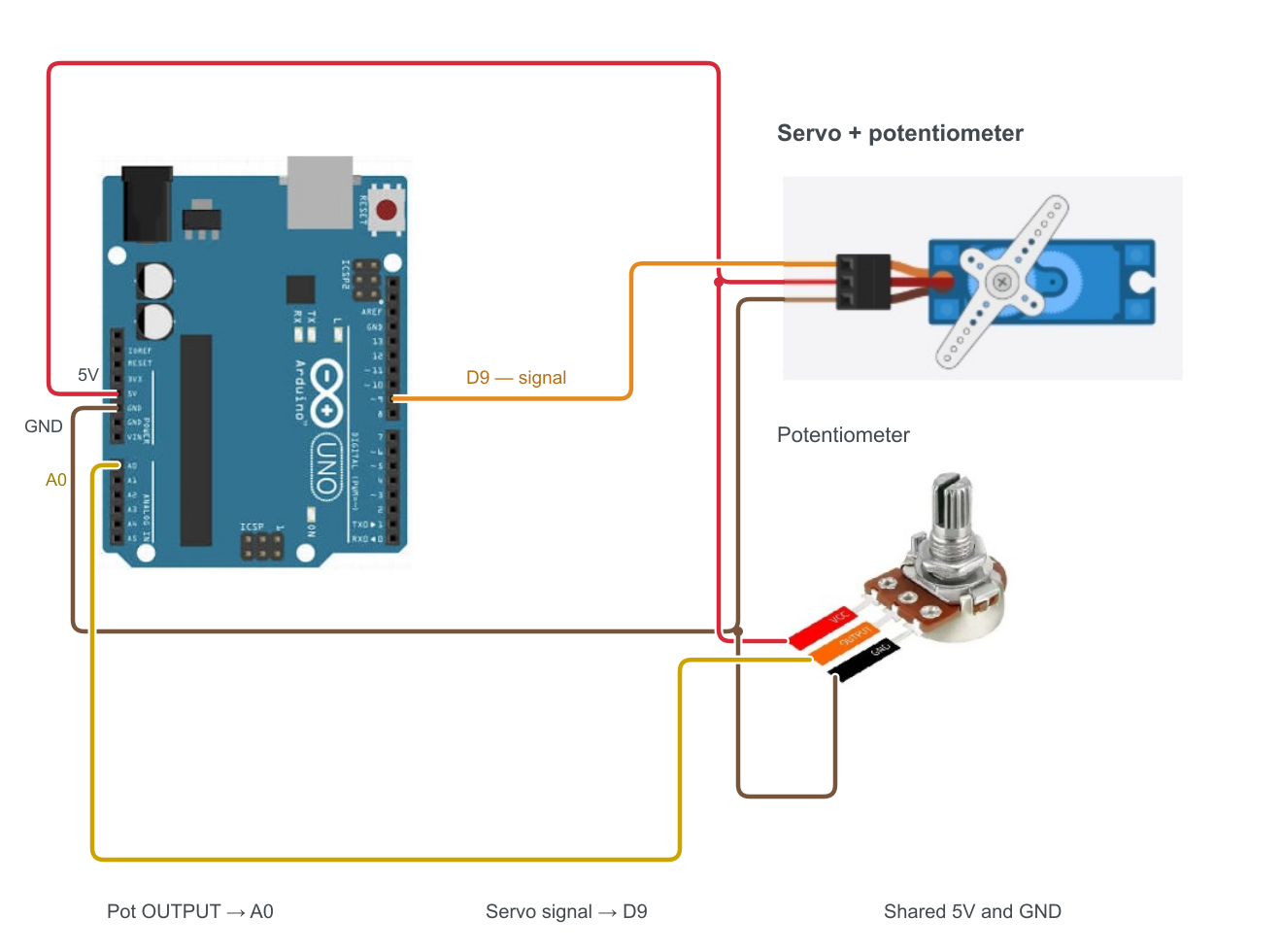
Project 09
Control the servo with the pot
The code.
#pragma region Declare

// Declare Servo
#include <Servo.h>
Servo myServo;

const int SERVO_MIN = 544;//450;    // Min "0" angle (Base 544)
const int SERVO_MAX = 2550;//2450;   // Max "180" angle (Base 2550)

const int SERVO_PIN = 9;

// Declare Pot
const int POT_PIN   = A0;   // Potentiometer pin

#pragma endregion

// Run
void setup() {
  Serial.begin(9600);                               // Init Seriall comm

  pinMode(POT_PIN,INPUT);                           // Set pot-pin to READ
  myServo.attach(SERVO_PIN, SERVO_MIN, SERVO_MAX);  // Init Servo pin map-clamped

  pinMode(V_OUT,OUTPUT);  // add extra 5v out
  digitalWrite(V_OUT, HIGH);
}

void loop() {

  int potValue    = analogRead(POT_PIN);                            // Read pot - Analog-range 0 to 1023
  int targetAngle = map(potValue, 0, 1023, SERVO_MIN, SERVO_MAX);   // Map Analog-range to pot-range
  myServo.write(targetAngle);                                       // Move Servo

  printMap(potValue, targetAngle);
}

// Logic
void printMap(int potValue, int targetAngle){
  Serial.print("Pot Value: ");
  Serial.print(potValue);
  Serial.print("  ->  Mapped Angle: ");
  Serial.println(targetAngle);
}

// Arduino -MAP-
// A proportion translator.
// Takes a number from one range, and scales it to another.
//
// in our case
//  - Pot-input range is Analog Read (0 to 1023),
//  - Servo-output range is us-calibration pulse width (544 to 2550).
//
// Map code:
//  long map(long x, long in_min, long in_max, long out_min, long out_max) {
//    return (x - in_min) * (out_max - out_min) / (in_max - in_min) + out_min;
// }
//
// Random potVal = 347
//
// Step 1: Get ranges:
//  Pot  - ( Range_A_Min , Range_A_Max ) -> Pot is (0,1023) (Analog reading range)
//  Servo- ( Range_B_Min , Range_B_Max ) -> Servo (544,2550)
//  - Actual pot-Range_A   = Range_A_Max - Range_A_Min -> 1023
//  - Actual Servo-Range_B = Range_B_Max - Range_B_Min -> 2006
//
// Step 2: Find the Input Shift
// potVal - (pot)Range_A_Min => 347 - 0 = 347
// Meaning: Since our input starts at 0, potVal is sitting exactly 347 units above its absolute minimum.
//
// Step 3: Scale Input into TARGET Range (Multiplication)
// 347 x 2006 = 696,082
// Meaning - like %. first mult, than div
//
// Step 4: Normalize to the SOURCE Range (Division)
// 696,082 / 1023 = 680.432 => to INTEGER = 680
// Meaning: Normalized pot val is 680 - roughly 33.9% of the way up.
// The value 680 represents exactly 33.9% of your servo's target range.
//
// Step 5: Apply the Baseline Offset (The Final Add)
// 680 + 544 = 1224
// Meaning: This shifts the percentage calculation away from 0 and positions it perfectly into your servo's real-world operational window.
//
// 20% off 100 is:
//  20 / 100 = 0.2 ; 0.2 x 100 = 20
//
// 347 / 1023 = 0.339 ; 0.339 x 2006 = 680
// and shift from "0" => 544+680 = 1224
// why the extra steps? cpu limitation. working with INTEGERS.
// 347 x 2006 = 696,082
//
// Human Math (Divide then Multiply):
// (347 / 1023 ) x 2006 = 680
// Arduino Math (Multiply then Divide):
// (347 x 2006) / 1023 = 680