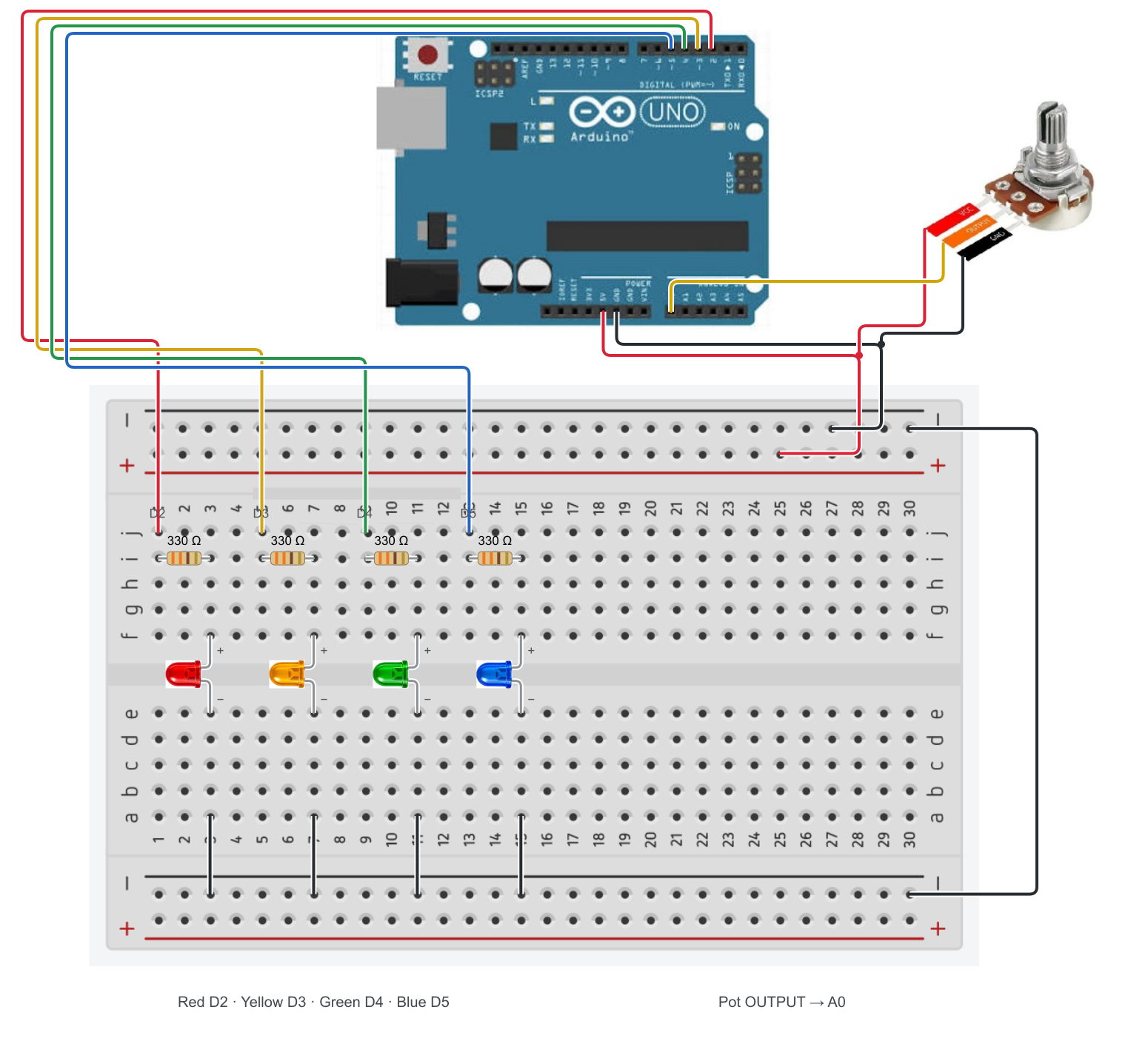
Project 03
Potentiometer — four LEDs
The code.
//Declare
const int POT_PIN     = A0; // Potentiometer connected to Analog Pin A0

const int LED_RED     = 2;
const int LED_YELLOW  = 3;
const int LED_GREEN   = 4;
const int LED_BLUE    = 5;

//Setup
void setup() {

  // Init serial comm
  Serial.begin(9600);         // Run at 9600 bits per second

  // Set pin modes
  pinMode(POT_PIN, INPUT);

  pinMode(LED_RED, OUTPUT);
  pinMode(LED_YELLOW, OUTPUT);
  pinMode(LED_GREEN, OUTPUT);
  pinMode(LED_BLUE, OUTPUT);

  // Init Leds
  allLedsOff();
}


//Run
void loop() {
  allLedsOff();                         // Resset leds
  int potValue = analogRead(POT_PIN);   // Read pot value (Analog : 0 to 1023)
  printPotVal(potValue);                // Print value to Serial Monitor
  lightLed(potValue);                           // Light one led
  delay(100);                           // Delay for visibility
}

//Logic
void printPotVal(int potVal){
  Serial.print("Pot Value: ");
  Serial.println(potVal);
}

void lightLed(int potVal){
  // Check the value and turn on the corresponding LED
    if (potVal >= 0 && potVal < 256) {
      digitalWrite(LED_RED, HIGH);                  // Zone 1: 0 to 255
    }
    else if (potVal >= 256 && potVal < 512) {
      digitalWrite(LED_YELLOW, HIGH);               // Zone 2: 256 to 511
    }
    else if (potVal >= 512 && potVal < 768) {
      digitalWrite(LED_GREEN, HIGH);                // Zone 3: 512 to 767
    }
    else if (potVal >= 768 && potVal <= 1023) {
      digitalWrite(LED_BLUE, HIGH);                 // Zone 4: 768 to 1023
    }
}

void allLedsOff(){
  digitalWrite(LED_RED, LOW);
  digitalWrite(LED_YELLOW, LOW);
  digitalWrite(LED_GREEN, LOW);
  digitalWrite(LED_BLUE, LOW);
}